×
- Hello
- Login or Register
- Quick Links
- Live Chat
- Track Order
- Parts Availability
- RMA
- Help Center
- Contact Us
- Shop for
- Hyundai Parts
- Hyundai Accessories


My Garage
My Account
Cart
Genuine Hyundai Excel Clutch Cable
Clutch Cable Wire- Select Vehicle by Model
- Select Vehicle by VIN
Select Vehicle by Model
orMake
Model
Year
Select Vehicle by VIN
For the most accurate results, select vehicle by your VIN (Vehicle Identification Number).
1 Clutch Cable found
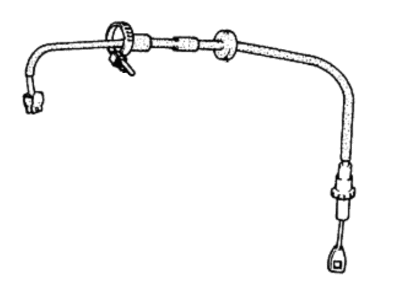

Hyundai Excel Clutch Cable
With the Hyundai Excel Clutch Cable, drivers can easily disconnect the engine from the gearbox, allowing for easy shifting and no stalling. The Clutch Cable disconnects the clutch plates by turning pedal action into a quick pull on the release mechanism, allowing the driver to stop, start, and creep at low speed without cutting the engine. The first Excel models utilized a simple steel stranded Clutch Cable, while the later Hyundai subcompact versions often came with a corrosion resistant cable from kits containing an adjustable nut, quadrant, and fork. Though both styles perform the same function, the kit-style unit reduces installation time, allows finer adjustment (which can lower pedal stiffness), and helps the clutch fulfill its expected two-year service window. Every Hyundai Excel, regardless of model year, will benefit from the replacement of a frayed Clutch Cable at the very first signs of a heavy or non-returning pedal or grinding shifts. A snapped line leaves the pedal on the floor. The new Clutch Cable is inexpensive and straightforward to install. It takes around one hour for the average DIY driver. Designed to Hyundai Excel specifications, the cable restores a precise feel to the clutch system.
If you are looking for affordable high-quality OEM Hyundai Excel Clutch Cable, then you have come to the prime place. Our website provides a large amount of genuine Hyundai Excel Clutch Cable at unbeatable prices. All our parts come backed with the manufacturer's warranty.
Hyundai Excel Clutch Cable Parts Questions & Experts Answers
- Q:How to remove the clutch cable on Hyundai Excel?Posted by Melody N.A:Start by disconnecting the clutch cable from the battery's negative terminal. Unscrew the adjuster wheel for slack and remove the cotter pin from the clutch release lever. Disconnect the cable end from the clutch pedal under the dash. Pull the cable through the firewall from the engine side, removing any stuck grommets. To reinstall, lubricate the ends with grease and reverse the removal steps. Adjust the clutch pedal freeplay.Answered by Hyundai Parts Specialist Allen / Jan 23, 2025